

Member of
- Associated Builders and Contractors, Virginia chapter
- American Subcontractors Association, National member
Who it's for
One platform, three kinds of company.
Tasks live in one app, time in another, drawings in a third, and the daily report in somebody's camera roll. ZonePillar puts the whole job in one place, so the crew updates it from the phone, the office runs it from a browser or an iPad, and your GC sees what you choose to share.
Subcontractors
The full platform
Projects and task trees, crew scheduling, GPS time tracking, field reports, RFIs, submittals, change orders, payroll, pay applications, expenses and materials.
See ZonePillar for subcontractorsGeneral contractors
A jobsite console
Connect your subcontractors, see progress and crew on site, run submittal and RFI registers, and keep the jobsite schedule.
See ZonePillar for general contractorsEngineering firms
A review inbox
Receive the RFIs and submittals your GC routes to you, review the documents, and respond with your stamp.
See ZonePillar for engineering firmsHow it fits together
A day on the job, start to finish.
The same record carries the job from the first task tree to the last pay application, so nobody retypes anything between the field and the office.
- 01
Plan
Break the job into floors, rooms and tasks.
- 02
Schedule
Book crews onto jobsites for the week.
- 03
Clock in
GPS time clock with geofenced jobsites.
- 04
Build
Update tasks with photos, notes and issues.
- 05
Report
Daily reports, RFIs and submittals.
- 06
Get paid
Payroll, pay applications and job costs.
In the product
The tools construction teams open every day.
Five of the screens your office and field will live in. There are 57 features in all; browse them by area.
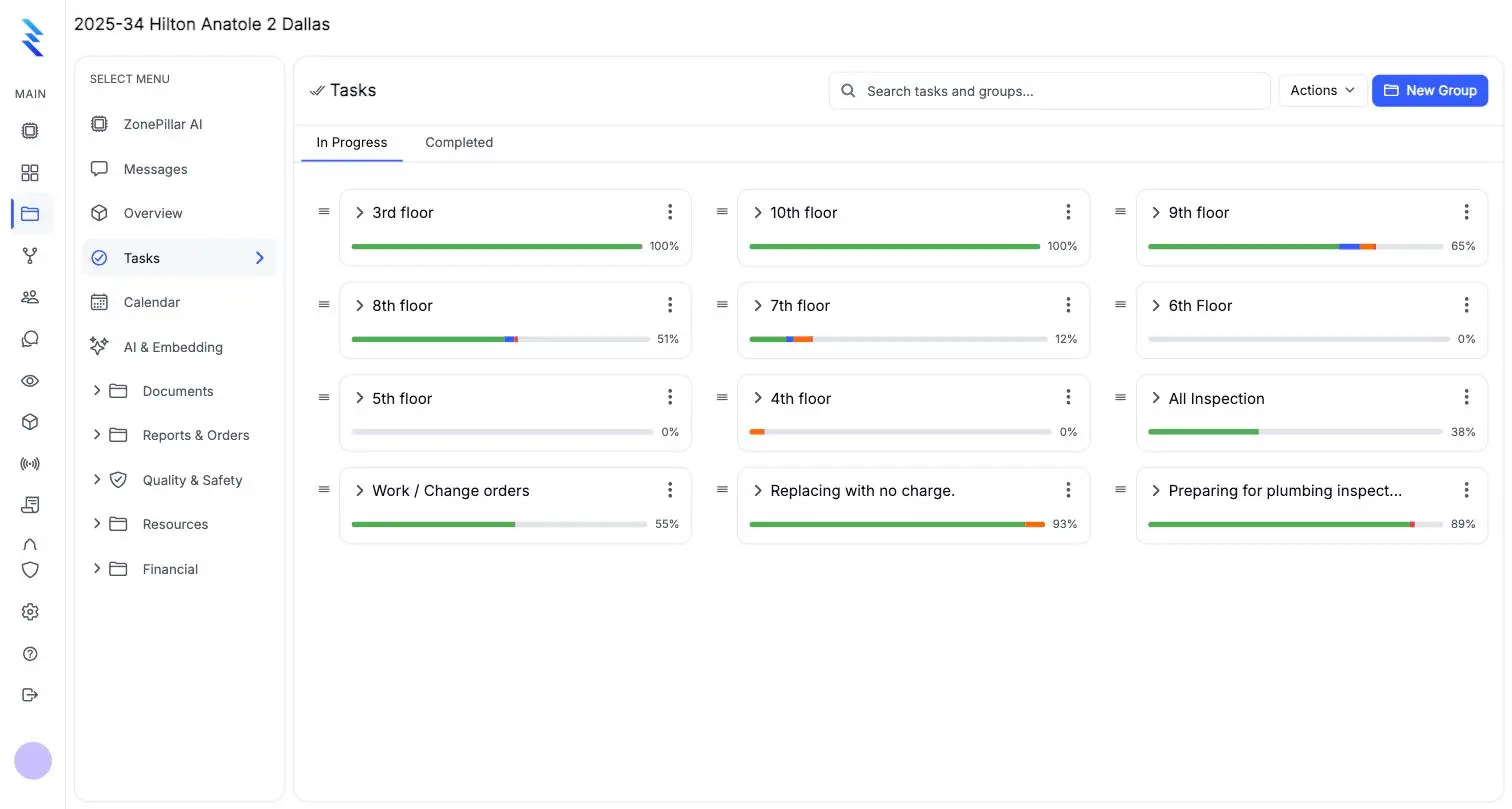
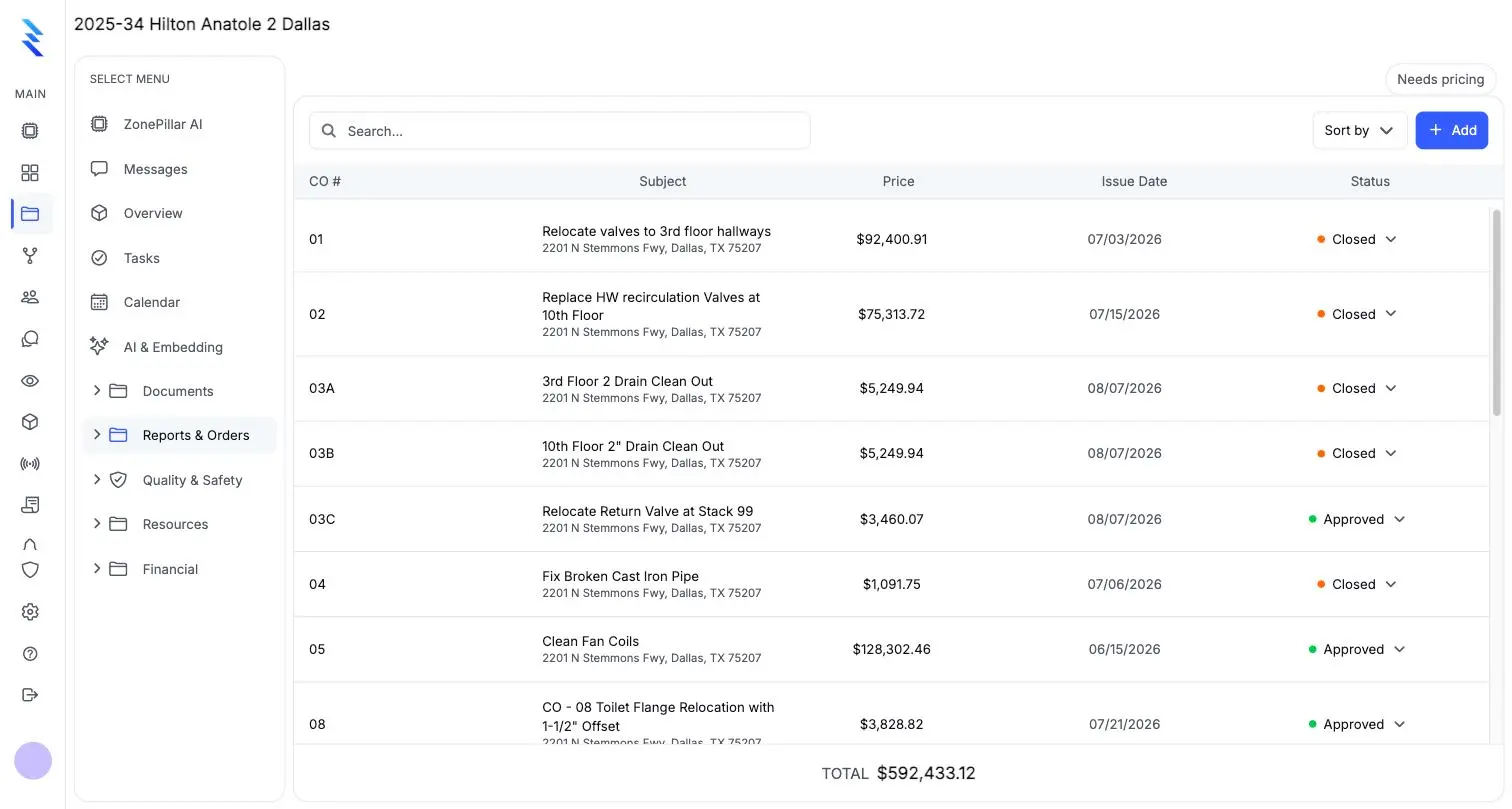
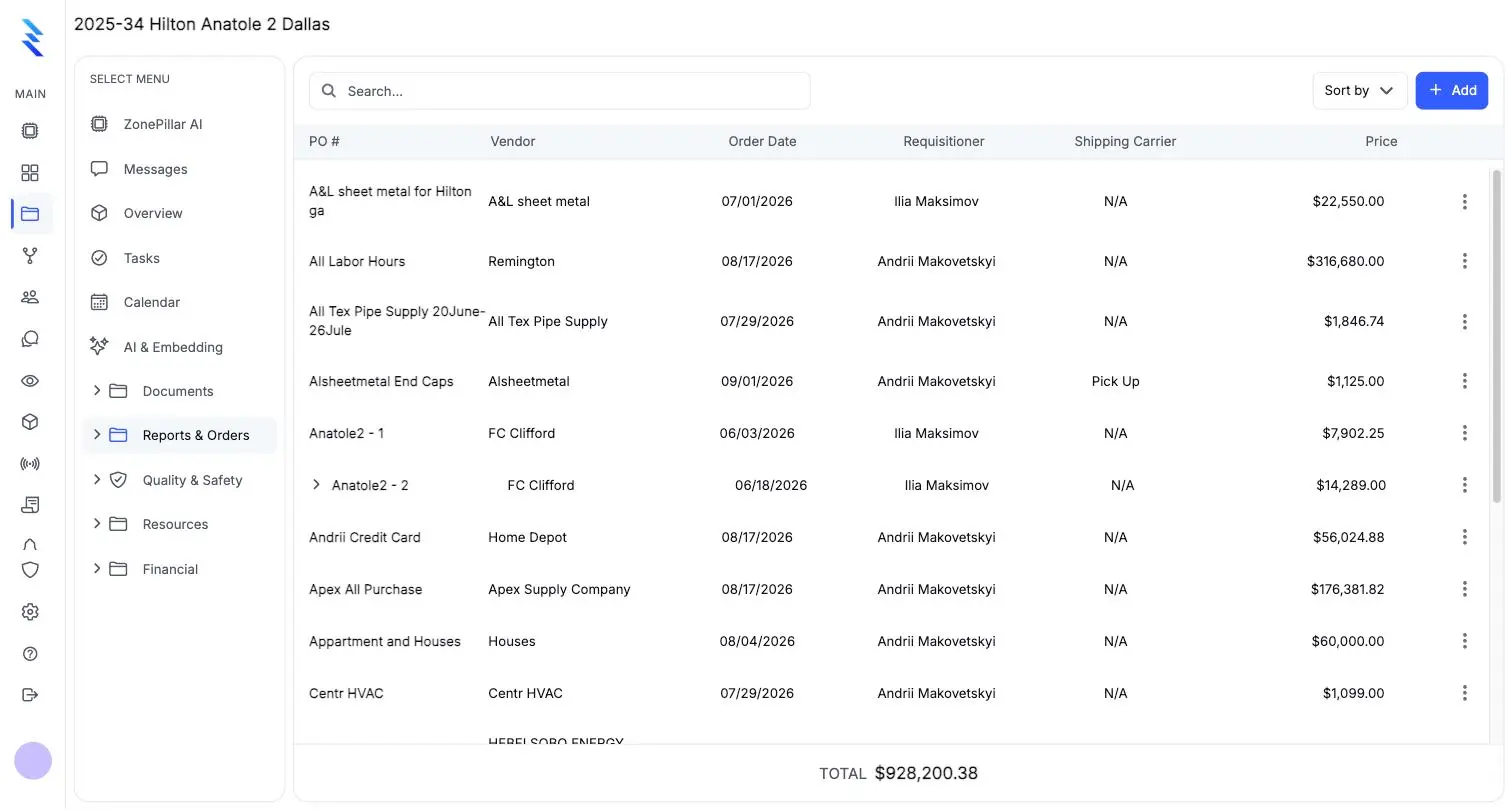
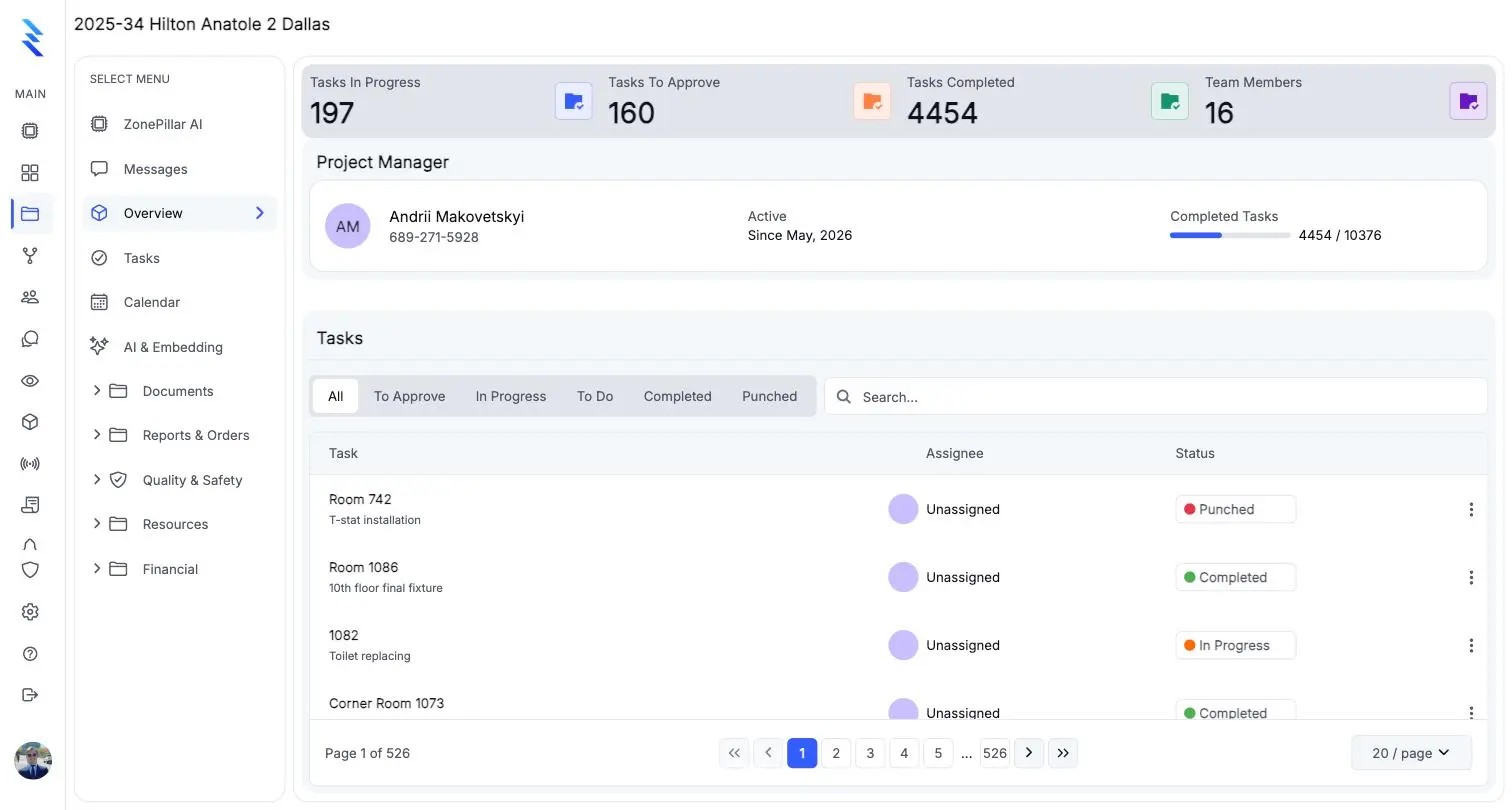
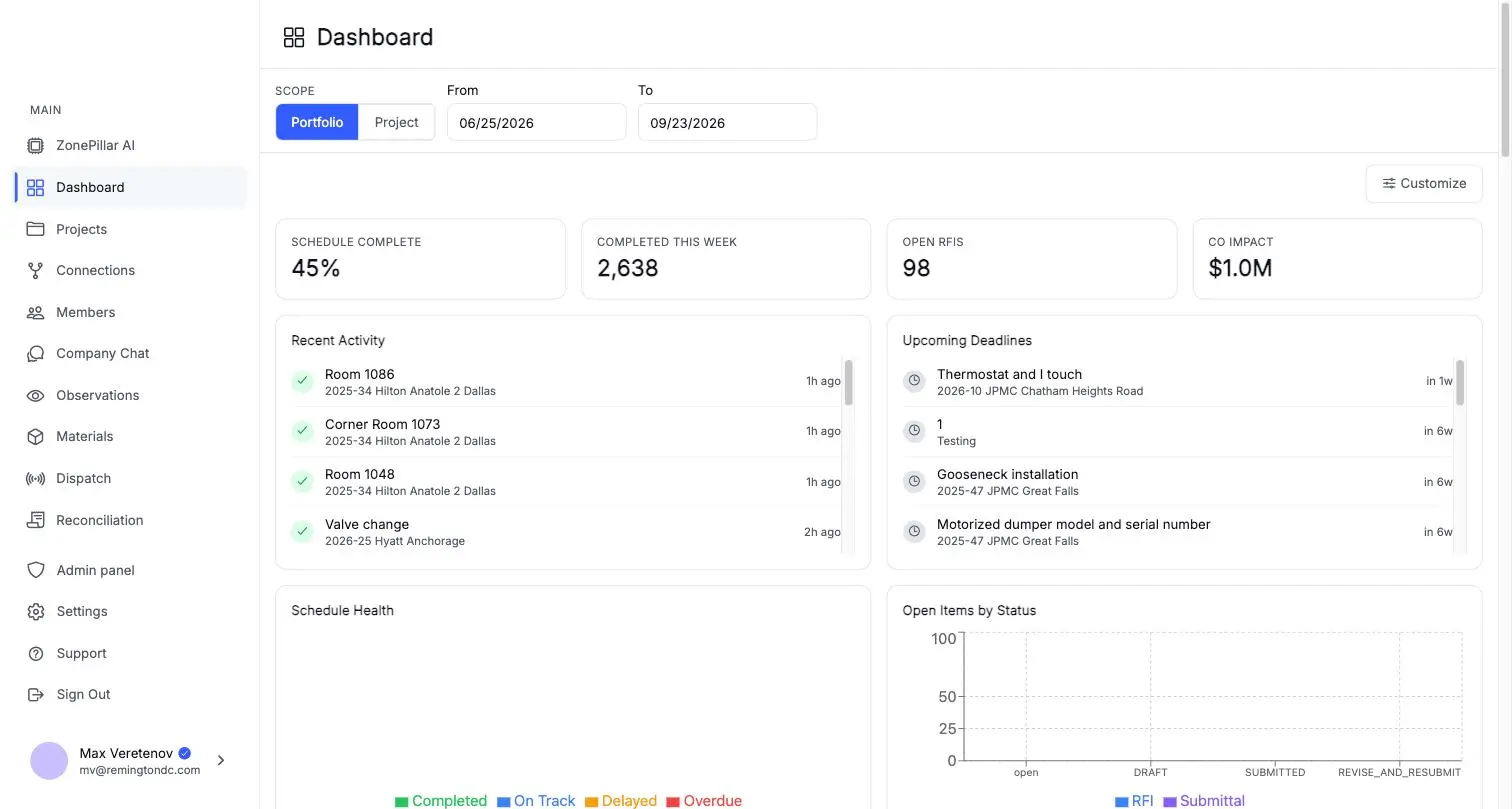
The whole platform
Explore the platform by area.
Six areas, 57 features, each area with its own page. See all features.
Field operations
The work, the crew and the hours.
- Projects & teams
- Task trees
- Proof of work
- Bulk tools & Excel
- and 14 more
Documents & drawings
Every record, one place, ready to send.
- RFIs
- Submittals
- Change orders
- Work orders
- and 5 more
Costs, payroll & materials
Connect the field to the money.
- Receipts
- Card reconciliation
- Spend review & job costs
- Payroll from tracked time
- and 5 more
Working with your GC, subs & engineers
Companies connect on ZonePillar and work from the same information. Each company keeps its own data and chooses what to share.
- Invite & link
- You control sharing
- Situation Room
- Jobsite schedule
- and 2 more
ZonePillar AI
Ask your projects anything.
- Answer
- Count & total
- Drawings
- Show on the sheet
- and 5 more
Administration, security & support
Sensible defaults, then control per person.
- Roles & permissions
- Secure sign-in
- People
- Notifications
- and 2 more

ZonePillar AI
Ask your projects anything.
An assistant that reads your RFIs, submittals, orders, tasks, reports and drawings, answers with the sources, and drafts the work for you to approve. Ask in plain words, from the whole company or from inside one project.
- Answer
- Finds and summarizes. Open RFIs, latest submittals, what a record says, who changed it and when.
- Count & total
- Does the arithmetic. Counts, totals and breakdowns laid out as tables, with each figure traced to a record.
- Drawings
- Reads your plan sets. Sheets, rooms, equipment tags and the details a callout points to.
- Show on the sheet
- When an answer comes from a drawing, its link opens that sheet with a box around the exact spot the information came from.
- Revision compare
- Compares each new plan revision with the one before, sheet by sheet: red for what was there, blue for what was added. Sheets that changed with no new revision entry are flagged Not disclosed.
- Plan check
- Reads a set of drawings together for errors, like equipment that does not match its schedule or sizes that do not add up. Each finding is outlined on the drawing, and Draft RFI fills in the RFI for you.
- Build
- Lays out the work. Task groups and tasks by floor and room from the drawings; copies a floor and renumbers it.
- Draft
- Prepares documents. RFIs, submittals, change orders, work orders, purchase orders, observations and daily reports.
- Look up
- Searches the web for public facts like manufacturer data or code requirements, and cites the source.
Create the task groups for the second floor, one per room.
Sheet A2.02 shows 30 rooms on the second floor. I will create one task group per room under Floor 2, with the four standard tasks in each, 120 tasks in all.
SourcesA2.02 Second floor planFloor 1 task groups
Waiting for your approval
Create 30 task groups and 120 tasks in Floor 2
- Rooms 201 to 230, numbered from the drawing
- Rough-in, inspection, finish, punch in each room
- Nothing is written until you approve
- record questions answered correctly
- 78 of 80
- tests where it invented a fact or ID
- 0 of 108
- rooms built from one request, 120 tasks
- 30 of 30
From ZonePillar's own testing against live project data, September 2026. ZonePillar AI is switched on company by company, works in the office app on web and tablet, and uses AI tokens from your plan. AI output is a draft for your team to check, not professional advice.
Integrations
Works with the tools already on the job.
Schedules from MS Project and Primavera, card statements from Chase and Capital One, Excel in and out, and connections to Procore, ADP and Autodesk Forma. Everything else gets a PDF, Excel or CSV export.
Procore
Bring projects, RFIs, change orders, purchase orders, work orders and submittals across from Procore.
ADP
Payroll connection to your ADP account.
Autodesk Forma
Connect Autodesk Forma projects, formerly Autodesk Construction Cloud, to your jobsites.
Oracle Primavera P6
Import a .xer schedule to create a jobsite with up to 1,000 activities and dates.
Microsoft Project
Import a .mpp schedule, pick the rows you want, and assign activities to your subs.
Microsoft Excel
Import task lists and estimates. Export boards, schedules, logs, payroll and pay applications.
Dropbox
Browse your Dropbox folders inside every project's files.
Chase
Upload card statements and match charges to receipts automatically.
Capital One
Upload card statements and match charges to receipts automatically.








White-glove onboarding
We don't hand you a login and wish you luck. We set up your first project ourselves and train your crew to run it — hands-on, through the whole first job.
We build what you ask for
We demo first, then ask what's missing or what you miss from the software you already use. A couple of weeks later it's in the product. Most vendors quote you quarters for the same request.
A development shop underneath
ZonePillar is built and run by a custom software studio. If your team needs something that doesn't exist in any construction product yet, we can build it on top of the platform.
What changes
The job doesn’t change. What you can prove does.
- 3.5×
- Revenue growth over three yearsAt the subcontractor ZonePillar was originally built inside and run for.
- ~50×
- More project data capturedCompared with a paper or manual process.
- ~50%
- Faster document creationSubmittals, RFIs, change orders, daily reports.
- ~90%
- Reduction in back-charges paidWhen job-site records are there to dispute the claim.
- ~2×
- Faster field-to-office coordinationOne record both sides are working from.
Construction has no single baseline — some companies are fully digital, others still run on paper and pencil — so these are honest averages across the teams we work with, not guarantees of what your company will see. Ask us to show any of them live in a demo.
A contractor we work with was facing a back-charge claim they were being told to pay. Their ZonePillar job-site record was presented as evidence. The charges were withdrawn in full and the company was found not liable.
Better data doesn’t just save time. It settles disputes in your favor.
100%
of the disputed charges withdrawn, and no liability found against the contractor.
Office and field
The console for the office, the app for the crew, and both keep working without signal.
One account, the same records everywhere. The office runs the console in a browser or on an iPad; crews get a field app on the phone that queues its work and syncs when the signal returns.
Web browser
The full office console on any computer.
iPad & tablets
The same console, built for the jobsite trailer.
iPhone & Android
A field app built for crews, with the office tools in your pocket.
Offline
Phones and tablets keep working without signal and sync when it returns.
Getting started
Most setup happens inside the product.
From sign-up to the first crew clocking in. We set up your first project with you and train your crew to run it.
Your company
Sign up, or accept a ZonePillar proposal. Your account is created when it's signed and paid.
Your people
Invite by email or add a whole list, and set each person's role.
Your work
Create projects, import task lists from Excel, and upload plan sets.
Time & money
Draw geofences, set clock-in rules and pay cycle, register cards, build payroll.
The field
Crews install the app on iPhone or Android and sign in.
Partners
Invite your subs and engineers, or accept your GC's invitation.
Plans
Priced per company, by plan and seats.
Your proposal lists the exact plan, seats, add-ons and price. It's signed electronically and paid online, and your account is created when it's signed.
Starter
$99per month
1 manager and 5 laborers included
10 GB of files
- Email support
- Self-serve onboarding
- Monthly contract
Business
$250per month
3 managers and 5 laborers included
50 GB of files
- Email support
- Self-serve onboarding
- Monthly contract
Pro
$613per month
7 managers and 15 laborers included
250 GB of files
- Time & location tracking included
- Priority support, guided onboarding
- 50% off all add-ons
Enterprise
$1,206per month and up
14 managers and 25 laborers included
1 TB of files
- Time & location and Procore included
- Dedicated support, white-glove onboarding
- 50% off all add-ons
Extra manager seats are $79 a month and laborer seats $4 a month. Time and location tracking, the ADP connection and the Procore connection are add-ons on the plans that don't include them, and ZonePillar AI is billed by usage at $1 per 1,000 tokens.
See it on one of your own projects.
Bring a job you know well, its drawings, its crew and its paperwork, and see it in ZonePillar. We set up your first project with you and train your crew to run it.
Ready to Transform Your Construction Management?
Book a walkthrough with our team. We set up your first project with you and train your crew to run it.

Product
Contact
- 1207 Saugus Ct, Great Falls, VA 22066
- +1 (703) 362-4166
Copyright © 2026 ZonePillar, All Rights Reserved